
What is Individual Benchmarking?
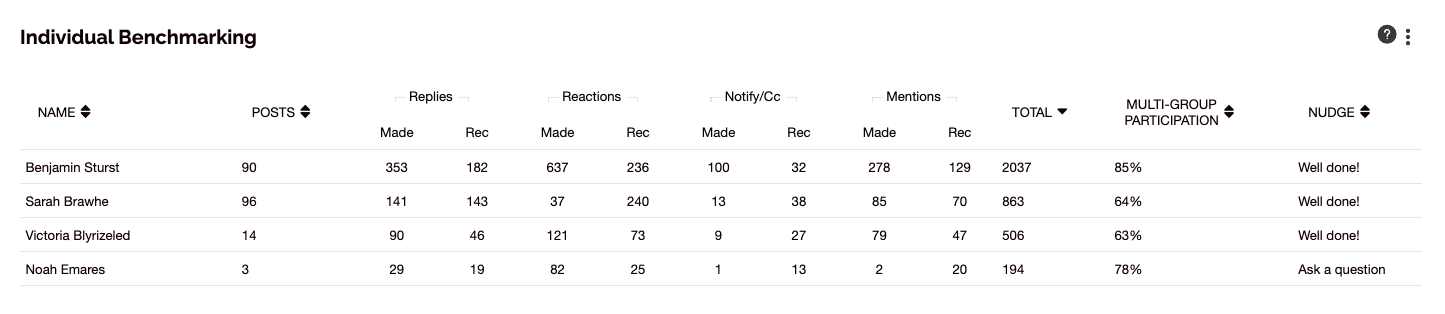
The Individual Benchmarking feature in SWOOP for Viva Engage allows you to see a leaderboard of users defined under a specific Segment, Topic or Community. One you click 'Show Results', SWOOP will automatically create the comparison of users. For example, in the Segments dashboard you can see a comparison of activity for all employees in the marketing department.
How to use Individual Benchmarking
Individual Benchmarking is a great way to present in-depth results to those who are members of a particular segment or community as well as those who have engaged with a topic. Many SWOOP Admins share Individual Benchmarking results to empower people with data to become better collaborators.
For Individual Benchmarking in the Topics dashboard, this will provide a complete list of users who have engaged with the selected Viva Engage topic, hashtag or keyword from most engaged to least engaged. Individual Benchmarking is a quick and easy way to find an extended list of influencers and highly engaged users who participated in your campaign.
Individual Benchmarking FAQs
Q: What does the header 'Rec' mean under the Replies, Reactions, Notify/CC and Mentions columns?
A: 'Rec' is shorthand for 'Received'. The Personal Benchmarking will show you the split between the activity types made by a user and received by the user
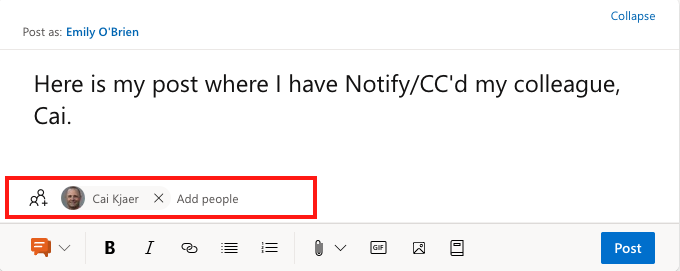
Q: What is a Notify/CC?
A: A Notify/CC is the section of a Viva Engage post where you ensure they receive a notification for your post but you are not directly mentioning them in the post copy. See the screenshot below:
Connect and discuss
Want to talk with others about this? Join our User Group on LinkedIn.